
OneMark vs HydroMark: Which OneNote Markdown Add-in Should You Use?
OneNote still has no native Markdown. If you want to write in Markdown without leaving OneNote, the two names you will keep running into are OneMark and HydroMark — both Windows desktop add-ins that render Markdown in place. They overlap on the basics, but HydroMark adds several capabilities OneMark lacks and undercuts it on price.
Quick comparison
| Feature | OneMark | HydroMark |
|---|---|---|
| Live preview (Enter renders line) | ✅ | ✅ |
| Render whole page (F5) | ✅ | ✅ |
| Export Markdown | ✅ clipboard | ✅ .md file |
| GitHub Flavored Markdown | ✅ | ✅ |
| Code highlighting | ✅ | ✅ |
| Tables / task lists / footnotes | ✅ | ✅ |
| LaTeX math | ⚠️ rendered to image | ✅ native OneNote equation (editable) |
| Diagrams | ⚠️ Mermaid incomplete | ✅ Mermaid and ZenUML |
Slash / command palette | ❌ | ✅ |
| Highlight boxes (INFO/WARN/IMPORTANT/ERROR) | ❌ | ✅ |
Inline ==highlight== | ❌ (not documented) | ✅ |
| Auto dark-mode adaptation | ❌ (not documented) | ✅ follows OneNote theme |
| Themes | ✅ CSS themes | ✅ themes & colors |
| License | Lifetime buyout / subscription, device-limited (Lite 1, Pro 2) | Basic ¥88 / Lifetime ¥128 / Annual ¥66, 2 devices (Family 5) |
| Platform | Windows desktop OneNote | Windows desktop OneNote |
What HydroMark has that OneMark doesn't
These are the differentiators that change daily use:
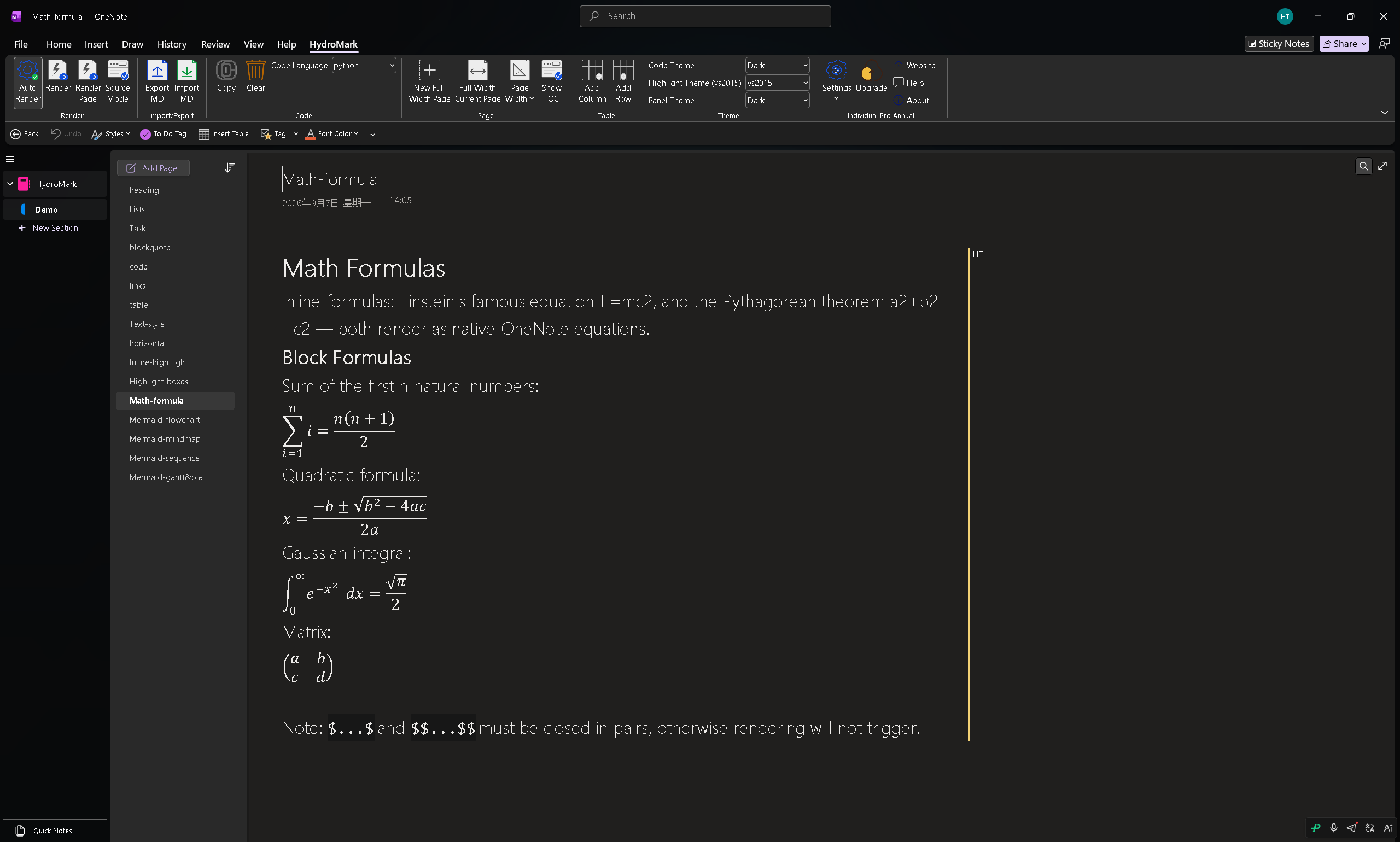
1. LaTeX as a native OneNote equation, not an image
OneMark converts LaTeX into a picture. HydroMark renders it as a real OneNote equation object — editable in place, scalable, and matched to the surrounding text. If you write math and need to tweak a formula after rendering, there is no re-export step.
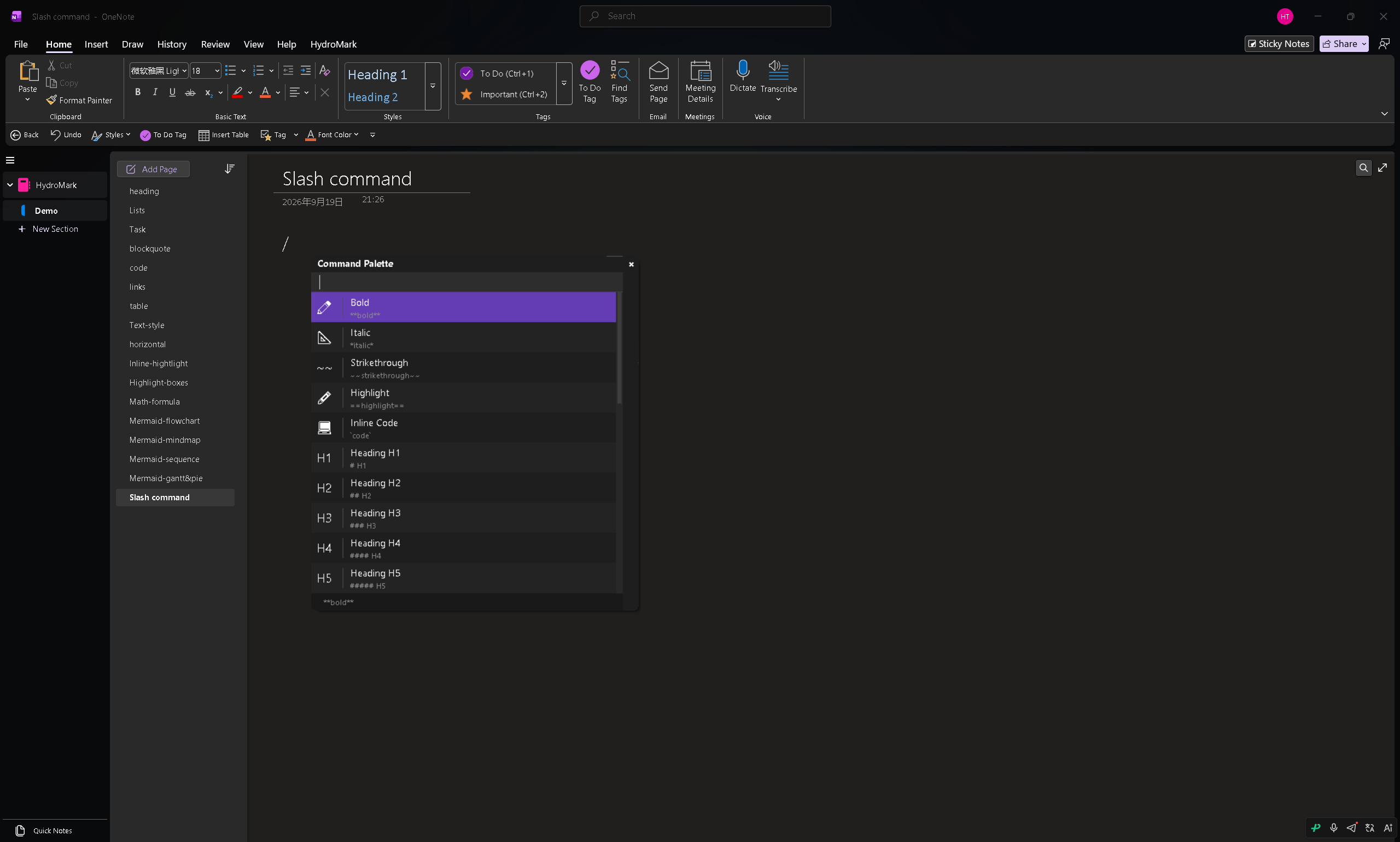
2. The slash / command palette
Type / anywhere and a searchable palette inserts headings, lists, code blocks, boxes, formulas, tables or diagrams. OneMark drives everything through a fixed shortcut set (Enter / F5 / F8 / Ctrl+) — fast once memorized, but there is no palette to discover or insert structured blocks.
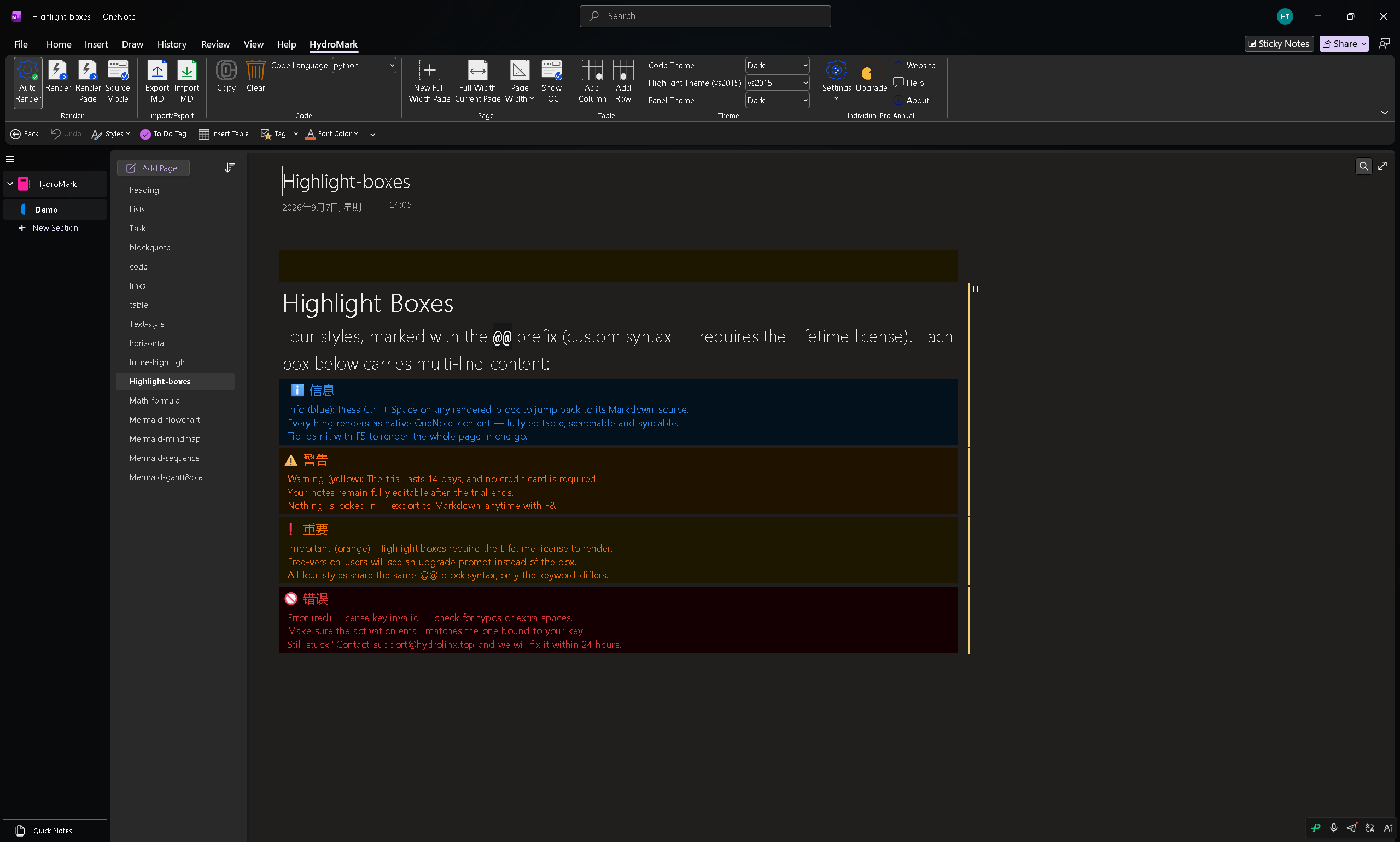
3. Highlight boxes (callouts)
HydroMark ships INFO / WARNING / IMPORTANT / ERROR callout boxes for notes that must stand out. OneMark has no dedicated callout feature.
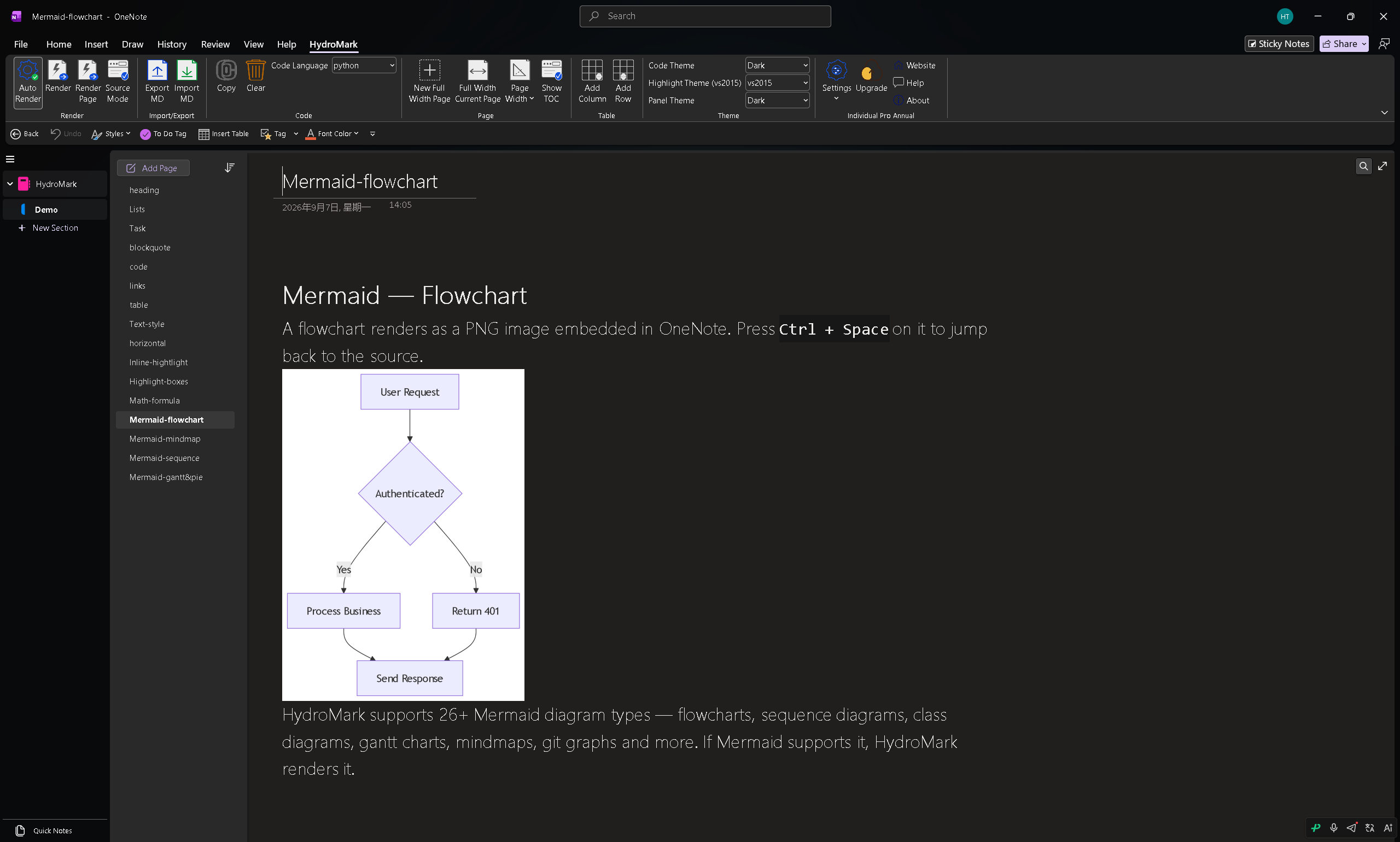
4. More complete diagrams — Mermaid and ZenUML
HydroMark renders both Mermaid and ZenUML. OneMark's Mermaid rendering is incomplete — in testing, several diagram types and syntax forms fail, so you cannot rely on it beyond the simplest flowchart.
5. Inline highlight + automatic dark mode
==text== gives inline marking inside a paragraph, and HydroMark automatically follows OneNote's light/dark theme. Neither is documented in OneMark.
Pricing and devices: HydroMark wins on both
| OneMark | HydroMark | |
|---|---|---|
| Cheapest tier | Lite — 1 device, buyout | Basic ¥88 / US$16 or Annual ¥66 / US$12, 2 devices |
| Full-feature tier | Pro — 2 devices (lifetime only after multi-year sub) | Lifetime ¥128 / US$23, one-time, 2 devices |
| Multi-device | capped at 2 devices | Family — 5 devices from ¥200 / US$36 |
Two concrete advantages:
- Cheaper. For the full feature set, HydroMark Lifetime is ¥128/US$23 — below OneMark's Pro, which only reaches lifetime after years of subscriptions. HydroMark's Basic (¥88 or Annual ¥66) already gives 2 devices, while OneMark's cheapest tier has 1.
- More activated devices. HydroMark Individual activates on 2 devices (beating OneMark Lite's 1), and Family activates on 5 — more than OneMark's 2-device maximum, at a lower per-device cost.
- Individual Basic — ¥88 (≈US$16) or Annual ¥66 (≈US$12). Core 7 features, 2 devices.
- Individual Lifetime — ¥128 (≈US$23), one-time, all 11 features, 2 devices.
- Family — from ¥200 (≈US$36), 5 devices.
- 14-day full-feature free trial on every plan.
Honest trade-offs
- OneMark is the longer-established, more old-fashioned option: a traditional bidirectional workflow and CSS theming some users prefer, plus its one-time buyout model.
- HydroMark's advanced features (diagrams, LaTeX, highlight boxes, themes) sit behind the Lifetime/Annual tier, so the Basic tier covers only the core Markdown set.
Which should you pick?
Pick HydroMark if you want: native-equation LaTeX, the
/command palette, highlight boxes, complete Mermaid + ZenUML, inline highlight, auto dark mode — and the lowest price in the category (Lifetime ¥128/US$23, 14-day trial).Pick OneMark if you specifically prefer a longer-established, traditional two-way workflow with CSS theming and its buyout model.
HydroMark: https://hydromark.hydrolinx.top
OneMark: https://onemark.neux.studio
Conclusion
For most users HydroMark is the better value: native-editable LaTeX, a slash command palette, highlight boxes, complete Mermaid and ZenUML, and lower per-device pricing. OneMark remains a fine choice for those who favor a traditional, CSS-themed two-way workflow. Try HydroMark's 14-day trial and see if the differentiators matter for how you take notes.